

STS Jobs 2026 In Sindh, the SIBA Testing Services (STS) serves as the platform for job applications and testing. Most major recruitment drives by the Government of Sindh are announced and published through this portal. Currently, applications are open for 635 positions of ‘Agriculture Field Assistant’ and 169 positions of ‘Crop Reporter’. Individuals who meet the eligibility criteria for these roles may apply.
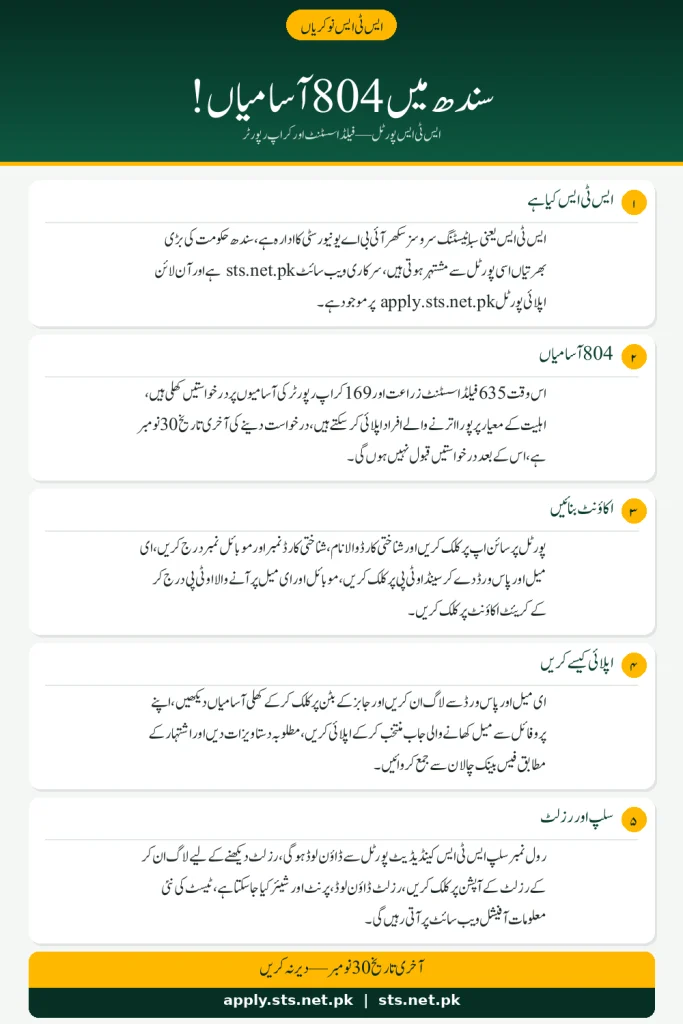
You can apply for any project managed by STS based on your profile. This guide provides a comprehensive explanation of the entire process. Upon visiting the official STS website, you will see a ‘Sign Up’ option. You need to create an account, search for jobs that match your profile, and then submit your applications. Full details are provided here, including instructions on how to download your roll number slip.
You Can Also Read: NADRA Introduces Biometric Verification
STS Jobs Online Apply Complete Details
| Information | Details |
|---|---|
| Testing Organization | SIBA Testing Services (STS) |
| Parent Institution | Sukkur IBA University |
| Official Website | https://sts.net.pk |
| Online Apply Portal | https://apply.sts.net.pk |
| Registration Requirement | CNIC, Mobile Number & Email |
| Account Creation | Free Online Registration |
| Application Process | Online Through STS Portal |
| Application Fee | As Mentioned in Job Advertisement |
| Fee Submission | Bank Challan |
| Roll Number Slip | Available on STS Candidate Portal |
| Test Updates | Through Official STS Website |
| Job Opportunities | Government Jobs Across Sindh |
How To Create STS Portal
The process for creating an STS portal account is very simple. First, visit the official STS website.
- Next, click on the ‘Sign Up’ button.
- Once you click the ‘Sign Up’ button, a portal page will appear. Enter your name (as it appears on your identity card), your identity card number, and your phone number.
- Provide your email address and a password, then click the ‘Send OTP’ button.
- You will receive an OTP on both your mobile number and your email address. Enter this OTP into the designated OTP code section.
- Then, click the ‘Create Account’ button. Once your account has been created,
- click the ‘Login’ button, enter your email address, and provide the password you selected.
- After logging in, click on the ‘Jobs’ button to view all currently open job vacancies.
- Review the jobs that match your profile and apply for them.
You Can Also Read: UAE to Launch Mira AI Assistant for Passport and Residency
STS Announcement
STS (Samba Testing Service) at IBA University has announced job openings. For those unfamiliar with the details, please note that the registration process is conducted online via the STS portal. The application process is entirely online, and the required bank challan must be paid through a bank. You can also download your roll number slip directly from the portal. Currently, there are 635 vacancies for the position of Field Assistant.
Additionally, there are 169 vacancies for the position of Crop Reporter. Anyone who meets the eligibility criteria is entitled to apply for these roles. If you fulfill the specified requirements, you may submit an application in accordance with the STS announcement. Please keep in mind that the deadline for applications is November 30th.
You Can Also Read: Punjab Imam Honorarium Scheme 2026
STS Result
If you have completed your registration with STS and are awaiting your result, you will be able to view it on the portal. To check your result, simply follow these easy steps: first, visit the official website.
Log in using your Gmail address and password, then click on the ‘Result’ option. You will be able to view full details regarding the status of your result. You can also download, print, or share your result. The testing service provides all this information through the portal.
Final Words
The registration process for the Siba testing service has been simplified, as has the procedure for applying to the available job positions. If you are a new user and wish to create a profile, you can easily do so by clicking the ‘Sign Up’ button.
If you already have an account, simply log in, identify the job positions that match your profile, and submit your applications. You will need to provide the required documents as specified; once these are submitted, your registration will be complete
[…] You Can Also Read: STS Jobs 2026 How to Apply Online […]